
DreamScape Designers are a professional landscaping company in Virginia Beach, VA. They were using Google Calendar to handle scheduling for materials delivery, project start dates, and appointments for in-person quotes.They had purchased large screen separate Google calendars on a single screen. The TVs were going to be installed in separate rooms so the calendars were always visible to their secratary, operations manager, and owner.
The requirements for this project taught me a lot about the flexibility of Google's API client for tailored business requirements. Beyond the view requirements, there were access concerns about privacy that needed to be addressed. I have replicated the project at a smaller scale to demonstrate the proof-of-concept. The calendar's demo data is entirely fictitous but reside on 2 separate private Google Calendars.
Mark Gonzalez
11th September 2018
The issues they faced were threefold:
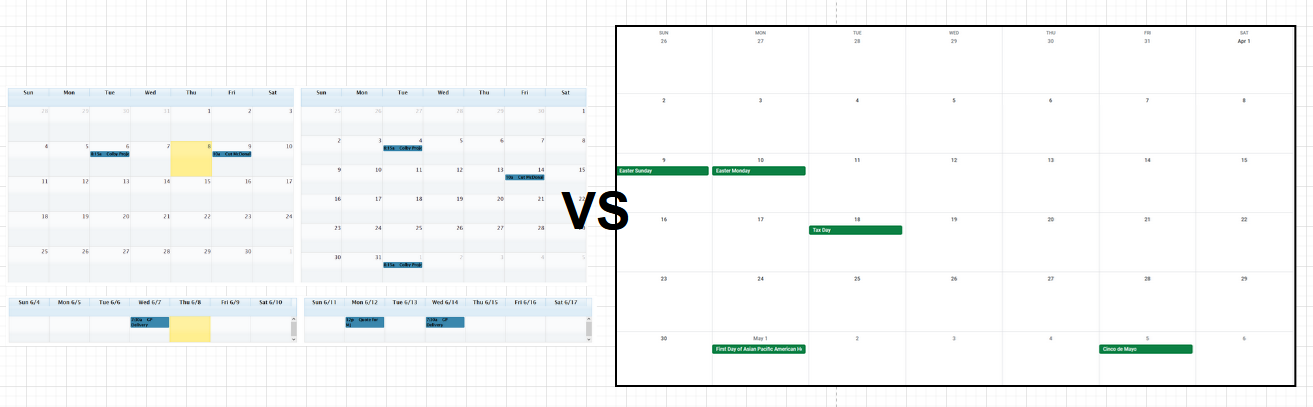
The first hurdle they faced with this multi-view solution is that Google Calendar does not have highly configurable calendar views. Google Calendar can only show one calendar frame at a time. All events from multiple calendars can be viewed in only one calendar frame. DreamScape Designers wanted to display the current month and following month in separate month views. Also, they wanted 2 weekly views for deliveries below the month views. All on the same screen. Similar to :
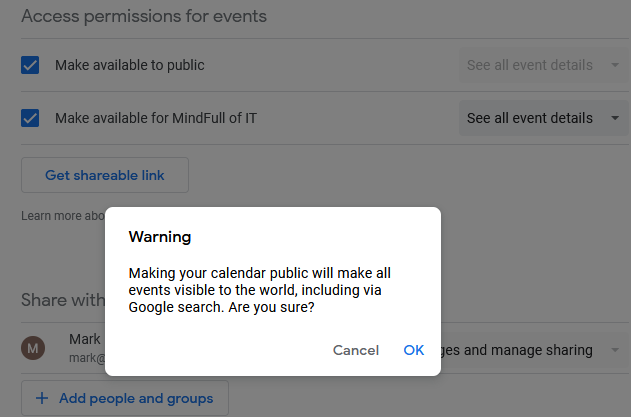
The Calendars needed to remain private. Setting a Calendar to public in Google means that all the events become available to the internet. Also, if you provide a link to the event inside a custom view so that authorized staff can view the event details: a public calendar would allow for unauthorized used to access the Calendar details.
The final problem is also an access concern. The computer displaying the Calendars was a micro-PC located in their office building. The owner wanted only that computer to be able to display the Calendars. In other words, he did not want to host the solution online. The demo I provide is clearly an online solution: but I show how to modify the API credentials to limit access to a specific device.
The first thing to tackle was the custom views. Using FullCalendar, creating a calendar object is relatively straightforward. For each object, different properties can be set and then events can be passed into the events property. These events are actually an array of events that will be passed in from the Google Calendar API. In the snippet below, that would be $encodedOperationEvents.
$("#calendar3").fullCalendar({
        fixedWeekCount: false,
		theme: true,
		height: 650,
        editable: false,
        header: {
		    left: "none",
			center: "title",
			right: "none"
		},

        events: '.$encodedOperationEvents.',
        eventRender: function(event, element) {
            element.find(".fc-title").append(" " + event.description);
        },
        eventClick: function(event, jsEvent, view){
            var viewer = $("#calendar").fullCalendar("getview");

            if (view.name == "month"){
                $("#calendar").fullCalendar("changeView", "agendaDay");
                $("#calendar").fullCalendar( "gotoDate", event.start );
            }
        }
    });
Next, we create a GCP project, set the OAuth API Credentials, and create a new App with Consent and Scopes with the following scope endpoint:
| https://www.googleapis.com/auth/calendar.readonly |
Selecting the correct credential type is important. An OAuth client ID will allow the application to access user content and data. Also, since I was using an Apache Server with PHP making the API calls, using the Web Application flow allows the application to acquire an access token.
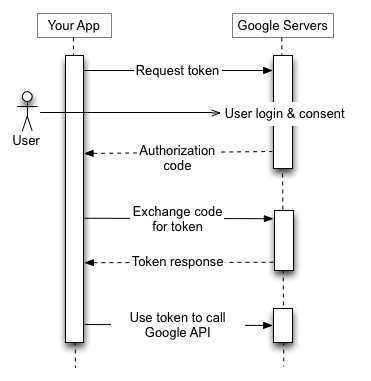
Really understanding this diagram is what makes the function calls make sense. I am using the Processwire CMF to handle the PHP calls via the Google API client. For web applications things really break down into 3 moving parts: the creation of Google Client instance, getting a token from Google via OAuth calls, and using that token to access Calendar events. The next two tabs show the code used on the live demo to make accessing Google Calendar possible.
I set up the authorized URI endpoint to do the following:
namespace ProcessWire;
use Google_Client;

require(wire('config')->paths->templates.'PATH_TO_AUTOLOADER');

define('APPLICATION_NAME', 'MultiCalendarView');
define('CREDENTIALS_PATH', wire('config')->paths->assets.'PATH_TO_TOKEN');
define('CLIENT_SECRET_PATH', wire('config')->paths->assets.'PATH_TO_CLIENT_SECRET');
define('SCOPES', 'https://www.googleapis.com/auth/calendar.readonly');

$client = new Google_Client();
$credentialsPath = CREDENTIALS_PATH;
$client->setApplicationName(APPLICATION_NAME);
$client->setScopes(SCOPES);
$client->setAuthConfig(CLIENT_SECRET_PATH);
$client->setAccessType('online');
$client->setRedirectUri('https://mark.mindfullofit.com/URL_TO_AUTHORIZED_URI');

// Google send the authentication code as a GET parameter
$codeSet = wire('input')->get('code');
// If we do not have a code, we need to authenticate with Google
if (! isset($codeSet)) {
    $auth_url = $client->createAuthUrl();
    wire('session')->redirect($auth_url);
} else {
    // Sanitize code using Processwire API
    $authCode = wire('sanitizer')->text($codeSet);

    // Exchange authorization code for an access token.
    $accessToken = $client->fetchAccessTokenWithAuthCode($authCode);
    $client->setAccessToken($accessToken);

    // Store the credentials to disk.
    if (!file_exists(dirname($credentialsPath))) {
        mkdir(dirname($credentialsPath), 0700, true);
    }
    file_put_contents($credentialsPath, json_encode($client->getAccessToken()));

    // Send us back to the calendar now that there is a valid access token
    $redirect_uri = 'https://mark.mindfullofit.com/multicalendar';
    wire('session')->redirect($redirect_uri);
}
Now that authorized URI is set up to handle authentication codes and tokens, I set up the Google Client API to be able to pass a client to the ProcessWire page that needs access to the private Google Calendars.
namespace ProcessWire;
require(wire('config')->paths->templates.'PATH_TO_AUTOLOADER');
use Google_Client;
define('APPLICATION_NAME', 'MultiCalendarView');
define('CREDENTIALS_PATH', wire('config')->paths->assets.'PATH_TO_TOKEN');
define('CLIENT_SECRET_PATH', wire('config')->paths->assets.'PATH_TO_CLIENT_SECRET');
define('SCOPES', 'https://www.googleapis.com/auth/calendar.readonly');

/**
 * Returns an authorized API client.
 * @return Google_Client|void the authorized client object
 */
function getClient()
{
    $client = new Google_Client();
    $client->setApplicationName(APPLICATION_NAME);
    $client->setScopes(SCOPES);
    $client->setAuthConfig(CLIENT_SECRET_PATH);
    // Access type is online for this demo
    // Can be set to offline for on-premise applications
    $client->setAccessType('online');
    // Redirect URI must match that set in API Credentials screen
    $client->setRedirectUri('PATH_TO_AUTHORIZED_URI');


    // Set the path to the credentials
    $credentialsPath = CREDENTIALS_PATH;
    if (file_exists($credentialsPath)) {
        $accessToken = json_decode(file_get_contents($credentialsPath),true);
        $client->setAccessToken($accessToken);
    }
    // token is not set because file does not exist
    // or the token is expired.
    if ($client->isAccessTokenExpired()) {

        if($client->getRefreshToken()){
            $client->fetchAccessTokenWithRefreshToken($client->getRefreshToken());
        } else{
            // Refresh token failed. Restart authorization process.
            $redirectUrl = $client->getRedirectUri();
            wire('session')->redirect($redirectUrl);
        }
    }
    return $client;
}
All that’s left is to use the newly created client to access private Calendar Events. The following is just an example of what can be done. The primary thing to remember is each Google Calendar has an unique ID that must be used to specify which calendar to pull events from.
// Get the API client and construct the service object.
$client = getClient();
$service = new Google_Service_Calendar($client);

// Setting different ranges  for dates
$monthAgo = date(strtotime('-62 days'));  //Get previous 62 days
$monthAgoFormatted = date('c', $monthAgo);
$day = date('w');	// PHP week enumerator (0 thru 6, Sunday = 0)
$week_start = date('c', strtotime('-'.$day.' days')); // Subtract today from itself to give us Sunday
$week_end = date('c', strtotime('+'.(14-$day).' days')); // Take today from 14 to get us next Saturday

// Optional parameters for Google events
$optParams = array(
    'maxResults' => 200,            // max number of events to show
    'orderBy' => 'startTime',
    'singleEvents' => TRUE,         // converts repeated events to single instances
    //'timeMin' => date('c'),       // specifies lower bound, default is today
    'timeMin' => $monthAgoFormatted  // sets lower bound to 31 days ago ~ a month
);

// An array to store the events
$eventsArray = array();
$emptyEvents = '';

// The Google Calendar ID of the private Calendar can be found in the Google Calendar sharing settings
$calendarId = 'GOOGLE_CALENDAR_ID';

// save the list to a calendar object
$results = $service->events->listEvents($calendarId, $optParams);

if (count($results->getItems()) == 0) {
    $emptyEvents .= "No upcoming events found.";  // empty set
}
else {
    foreach ($results->getItems() as $event) {
        $start = $event->start->dateTime;
        // sometimes, a start date is not indicated (like all day events)
        if (empty($start)) {
            $start = $event->start->date;
        }

        // store event data
        $eventsArray[] = array(
            'title'=>$event->title,
            'description'=>$event->getSummary(),
            'url'=>$event->htmlLink,
            'start'=>$start,
            'end'=>$event->end->date
        );
    }
}

// json encode the events array so it can be used by FullCalendar
$encodedOperationEvents = json_encode($eventsArray);
I completed this project years ago and I recently reflected on how it made me explore new options for what seemed to be a straightforward task. Looking back, I remember scouring the Google Developer Docs to get a handle on the Client API. It was different from how I used SOAP to process authorizations.
As simple as this solution was, the experience reminds me that the flow of data between users and applications is both elegant and critically important. Configuration settings should be well documented, flows should be understood, and solutions should consider nonfunctional requirements like access control and authentication.